← INEMA Events

WebMCP area · diagnosis, training and projects

Your site already talks to people. Now teach it to talk with agents.

The agents in the area AGI‑ready need somewhere to act. Today they arrive at your site, try clicking, typing and guessing. With WebMCP, the page itself describes what it knows how to do, and the agent talks with capabilities instead of operating pixels. This area combines free diagnosis, mental model, architecture, and WebMCP Training in four phases.

Passive scanner: collects evidence without running any tool on your site.

01 · What’s changing

The next visitor to your site may not be a person.

Three changes on the visitor side and three on the publisher side. If you own the site, the last three are your list.

Visitor 1

Agents already operate the browser

Models like GPT‑6 Astra open pages, fill forms and complete tasks on behalf of someone. The Computer Use course shows five flows of this. Without site help, the agent works blind. Computer Use shows five flows of this. Without site help, the agent works blind.
Visitor 2

Searching turned into asking

More and more people ask an AI assistant instead of typing into a search engine. The responder is the model, with what it managed to extract from the pages. Appearing there is a new problem, called GEO and AEO, and classic SEO does not solve it alone.

Visitor 3

The standard is just being born

WebMCP is an experimental technology, currently behind an Origin Trial in browsers. Those who understand the limitations early learn at a low cost. Those who wait for the standard to close arrive when competitors already have exposed tools.

Who publishes 4

The site stops being just a screen

In addition to the interface for people, the site now has a catalog of capabilities for agents: search, verify, initiate, confirm, consult. The human journey continues. The catalog sits on top.

Who publishes 5

Discovery becomes a requirement

Public files such as robots.txt, sitemap.xml and llms.txt, structured data in JSON‑LD, Open Graph and a clear identity of the entity. It is what an agent reads before deciding if your site is worth visiting.

Who publishes 6

Security stays with the site, not the model

Human confirmation before mutations, cancellation, fallback, permissions and real backend authorization. The rule of formation: no security decision is handed to the LLM.

On the agent‑command side, what changes in the work is the end of micro‑prompting and the architecture prompt + skills + context + tools + memory + evals, see the AGI‑ready area. This page is about the other side: the site that agents visit.

Open the AGI‑ready area →

02 · What is WebMCP

The agent stops operating pixels and starts conversing with capabilities.

Without WebMCP, an agent needs to locate fields, click, type and interpret the result on the screen. With WebMCP, the page itself describes capabilities, arguments and responses, and the agent calls the right tool by name.

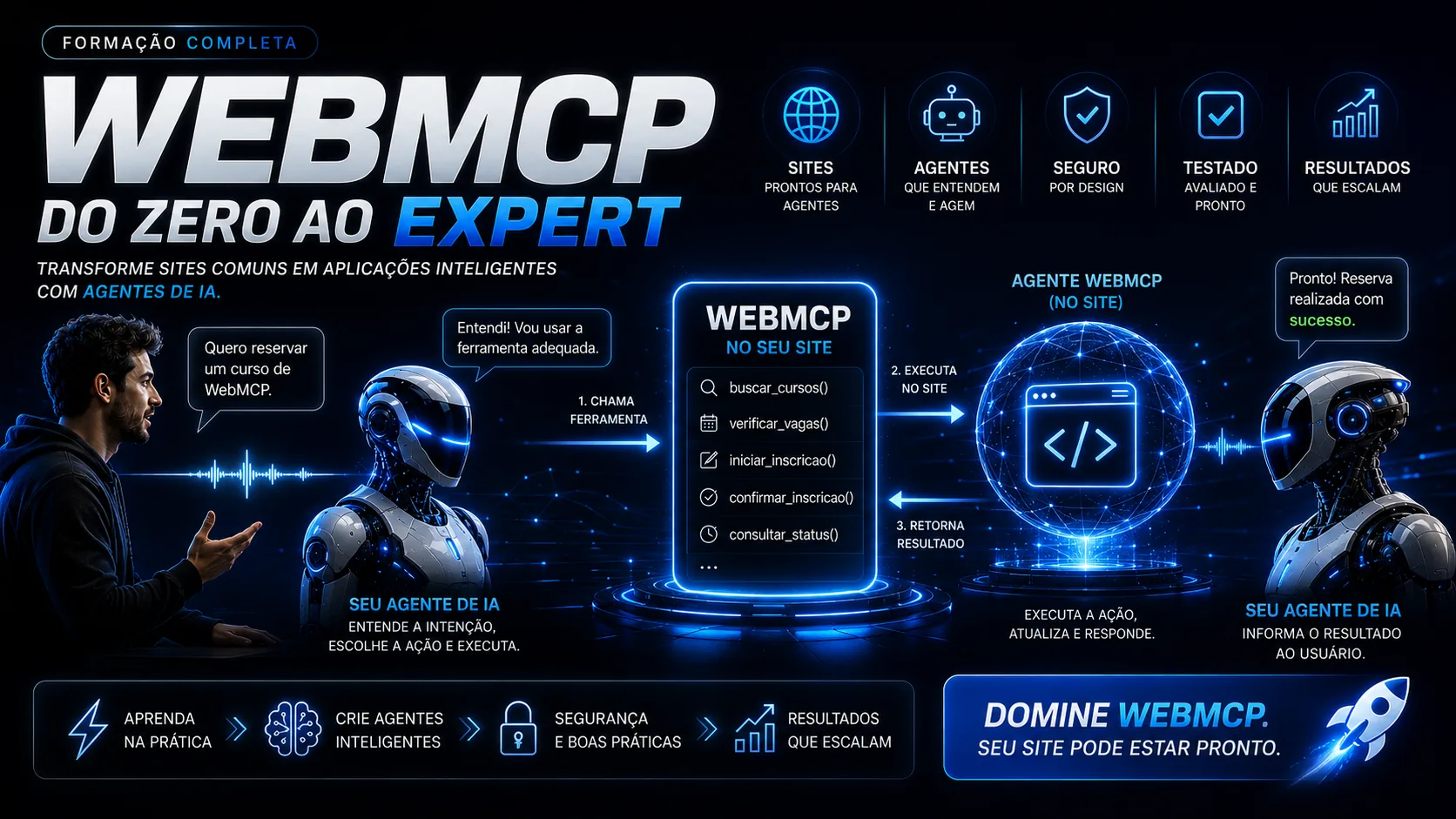
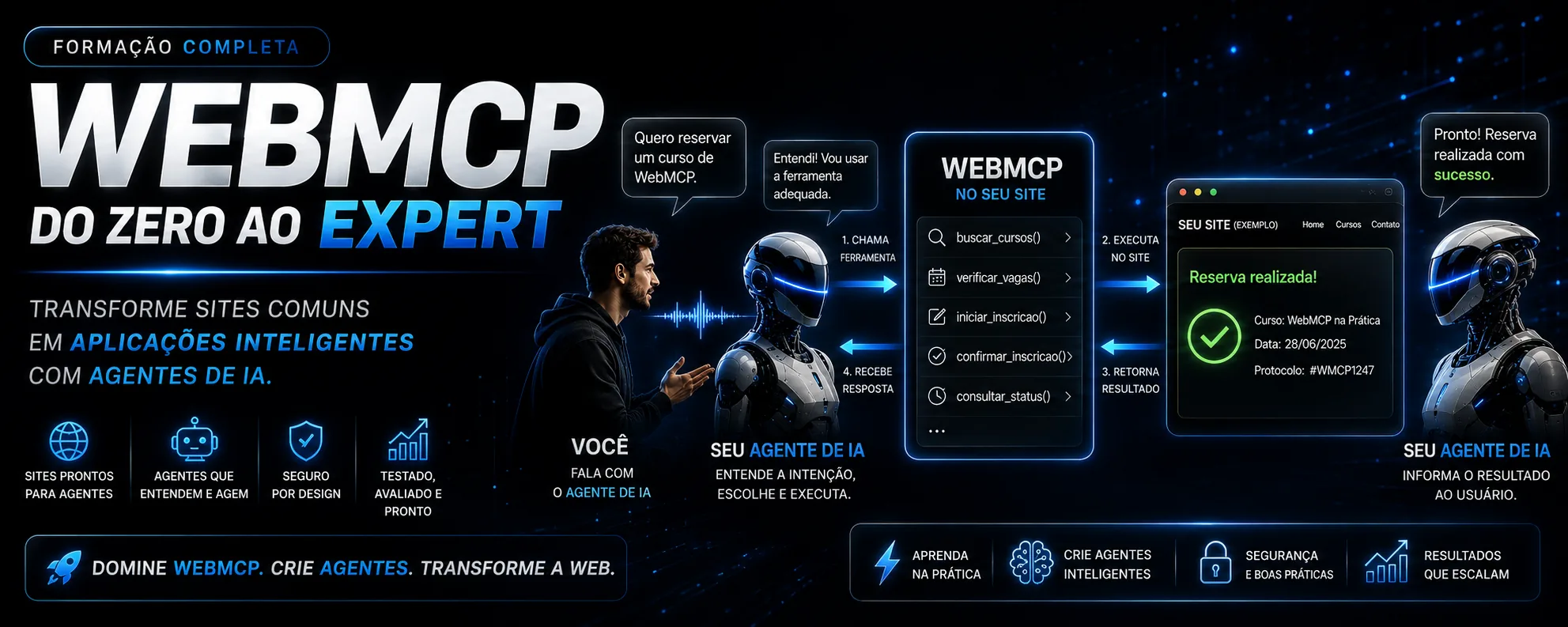
WebMCP flow: you talk to the AI agent and ask to book a course; the agent understands the intent and calls the appropriate tool in the site's WebMCP catalog, such as buscar_cursos, verificar_vagas, iniciar_inscricao, confirmar_inscricao and consultar_status; the site executes the action and returns the result, a reservation made with protocol; the agent informs the user of the result.
Four steps. The agent calls the tool, the site executes, returns the result and the agent replies to the requester.

Without WebMCP · the agent guesses

"I found a field that looks like a search. I typed the course name. I clicked the blue button. The page changed. I think it worked, but I don’t know if the spot was reserved.",

The agent operates the interface made for people. It works sometimes, breaks when the layout changes and no one knows what actually happened.

With WebMCP · the site describes itself

"The site exposes verificar_vagas and iniciar_inscricao, with the arguments and responses defined. I called the first, there is a spot. The second requires human confirmation before concluding.",

Tools with name, description, schema and understandable response. The site decides what is allowed, what needs confirmation and what can be cancelled.

Declarative tool

A form that already exists becomes a tool

The always‑present form gains a toolname and a description. Those who already have the human journey ready start here: little change, observable evidence in the scan.

Imperative tool

JavaScript that registers capabilities

The page registers tools with name, description, JSON Schema of input and output, handling state, errors, cancellation and fallback. It is the path to capabilities that don’t fit in a form.

Without WebMCP, the agent operates its screen.
With WebMCP, it converses with its site.

WebMCP, MCP and Web agentic is the first module of the Builder phase.

03 · Free diagnosis

Before studying, discover where your site stands.

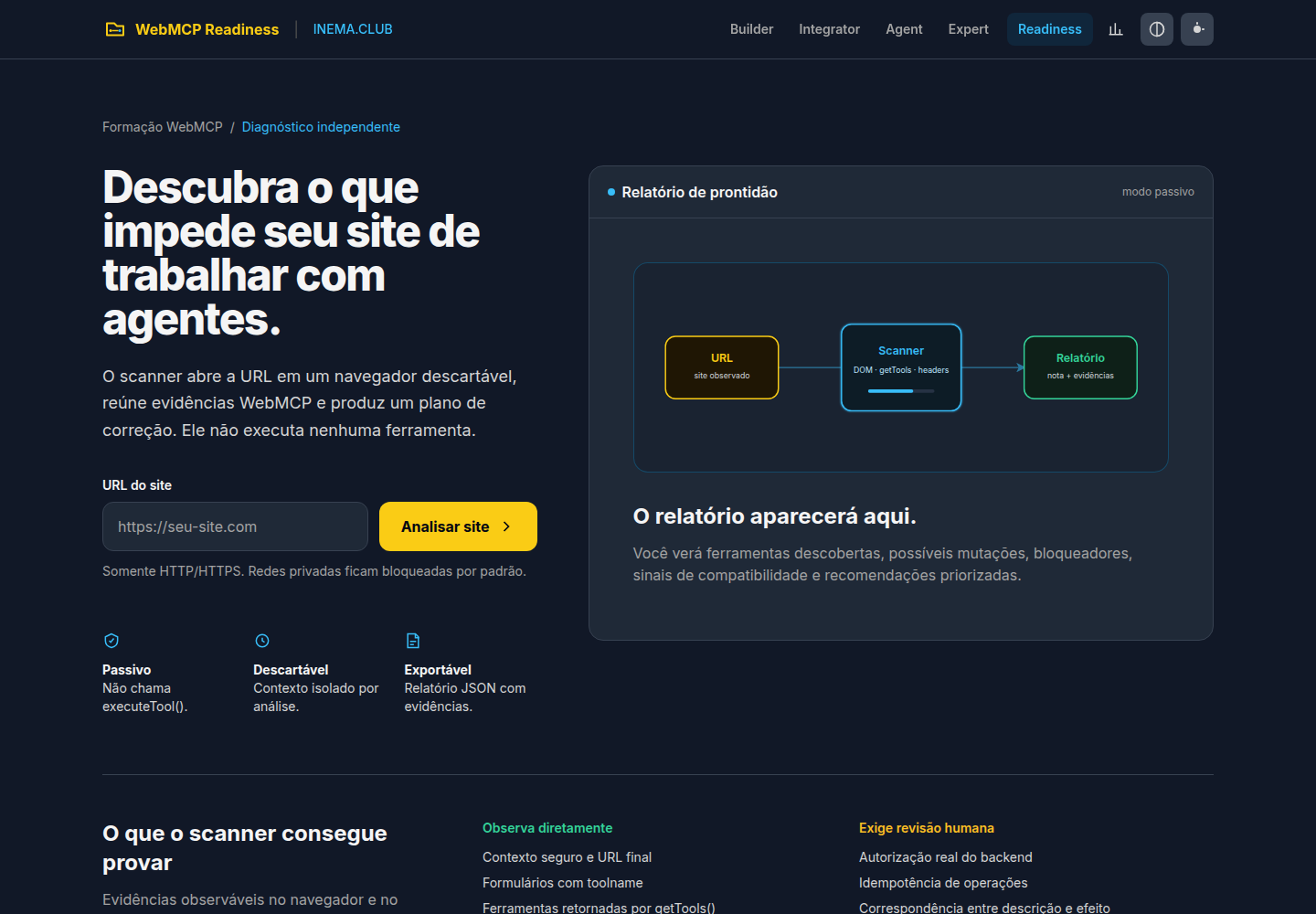
The WebMCP Readiness opens the URL in a disposable browser, gathers observable signals and turns the scan into a correction plan. Consult robots.txt, sitemap.xml and llms.txt. It does not execute any site tool.

WebMCPdeclarative and imperative tools, schemas, mutations, human confirmation, cancellation, fallback, Origin Trial and permissions
SEOindexability, title, description, canonical, headings, images, links, Open Graph and JSON‑LD
GEOentity identity, substantial content, authorship, updates, evidence and public discovery
AEOreal questions, direct answers, definitions, lists, tables and extractable content

You receive overall score and four independent scores, approved evidence, alerts and blockers, up to 12 prioritized fixes and the courses recommended for each gap. The report comes out in JSON, with the evidence.

WebMCP Readiness screen: discover what prevents your site from working with agents; site URL field and Analyze Site button; passive readiness report panel with URL flow, scanner, and report; and the columns of what the scanner can prove and what requires human review.
webmcp.inema.pro · passive, disposable and exportable.

What the scanner can prove

  • Secure context and final page URL
  • Forms with toolname and tools returned by getTools()
  • Definitions found in own scripts, marked as static discovery
  • Metadata, headings, structured data and public files
  • Editorial signals of GEO and AEO on the informed page

What requires human review

  • Real backend authorization
  • Idempotency of operations
  • Match between tool description and real effect
  • If a definition found in a bundle is registered and executable for every visitor
  • Indexing, ranking or citation by AI: the scanner does not promise any of that

Honesty of the diagnosis. The scan only deepens the provided URL; the sitemap is inventoried, but its pages are not crawled in this mode. Advanced phase scanners (Builder, Integrator, Agent Developer and Expert) appear in the report as planned, not as ready.

04 · The architecture of a site ready for agents

Discovery, tools, contract, state, control, permissions, backend and evals.

Eight layers, in the order the training builds. The first four are the site describing itself. The last four are the site protecting itself.

Layer 1

Discovery

Does the agent find the site?

robots.txt, sitemap.xml, llms.txt, JSON-LD, Open Graph, canonical and an entity with name, authorship and update.

Layer 2

Tools

What can the site do?

Declarative, from forms, and imperative, registered in JavaScript. Few, with names that say what they do.

Layer 3

Contract

What is it called and what does it return?

Name, description, JSON Schema of input and comprehensible response. The description must match the real effect.

Layer 4

State and errors

And when it goes wrong?

Modeled state, explained errors, possible recovery. The agent needs to know where it stopped.

Layer 5

Control

Who confirms?

Human confirmation before mutations, cancellation and fallback to the human journey when the tool does not resolve.

Layer 6

Permissions

Who can call?

Cross‑origin, permissions and policies outside the model. The LLM chooses the tool; the site decides if it can run.

Layer 7

Backend and MCP

Where does the truth live?

Hybrid architecture: WebMCP on the page, authorization and rules on the backend, MCP for what stays outside the browser. No duplicate rules.

Layer 8

Evals and observability

Is it really working?

Threat modeling, evals, logs, rollout and governance. That is what separates an experiment from a production operation.

Person→Agent→Discovery→Tool→Confirmation→Site→Backend→Response→Evals→Result
Where each layer is taught: 1 and 2 in the Builder phase; 3 and 4 in the Integrator; 5 and 6 in the Agent Developer; 7 and 8 in the Expert. The diagnosis above already measures the entire layer 1 and the observable signals of 2 and 5.

05 · Tips for this week

Six fixes the site owner does before any phase

Each tip corresponds to an item the scanner checks. Fix it, run again, see the score rise.

Tip 1

Run the scan before touching anything

Note the overall score and the four sub‑scores. Blockers come first in the correction plan. It’s your baseline, and it’s free.

Tip 2

Publish the three public files

robots.txt saying what can be read, sitemap.xml updated and a llms.txt that presents the site to AI models. The scanner queries the three in every analysis.

Tip 3

Fix the basic SEO that the agent also reads

Real title and description, one canonical per page, headings in order, images with alt, Open Graph and JSON‑LD describing the entity. None of this requires the Builder phase.

Tip 4

Write for those who answer questions

Real questions with direct answers, short definitions, lists and tables. That’s what the model can extract and cite. It’s the AEO score.

Tip 5

Show who’s behind it

Entity name, authorship, update date and public evidence of what you claim. That’s the GEO score, and it’s what makes a model trust your content.

Tip 6

Choose the first tool

Take an existing form that doesn’t change anything dangerous, like a search or status query. It becomes your first declarative tool in the Builder phase.

06 · WebMCP Training from Zero to Expert

An overview and four phases, organized by the work you need to do.

All open and in Portuguese. The phases use JavaScript and are for those who build or coordinate builders. A non‑programming site owner starts with the overview and diagnosis, and brings the phases to the team. Each phase has four modules of six topics.

Start here · overview

WebMCP Training — Sites and Agents from Zero to Expert

Transform traditional sites into applications understood and operated by AI agents. Explains prerequisites, progression, how the four phases connect and the final project. Includes readiness diagnosis.

Open the overview →
Phase 1 · build

WebMCP Builder

Transform sites into agent‑operable surfaces using declarative forms, JavaScript tools, JSON Schema, cancellation, fallback and a catalog validator.

  • 1.1WebMCP, MCP and Web agentic
  • 1.2Development environment
  • 1.3Experimental declarative API
  • 1.4Imperative API
Open Builder →
Phase 2 · integrate

WebMCP Integrator

Design coherent catalogs, model state and recovery, migrate existing sites and integrate WebMCP into modern applications without duplicating rules or removing the human journey.

  • 2.1Good tools
  • 2.2State, errors and recovery
  • 2.3Existing sites
  • 2.4Modern frameworks
Open Integrator →
Phase 3 · orchestrate

WebMCP Agent Developer

Build browser agents that discover, select and execute WebMCP tools with validation, policies, permissions, cancellation and observable conversational loop. Authorization is outside the model.

  • 3.1Tool discovery
  • 3.2Tool execution
  • 3.3Cross‑origin and permissions
  • 3.4Conversational loop
Open Agent Developer →
Phase 4 · operate

WebMCP Expert

Bring WebMCP solutions to production with threat modeling, hybrid WebMCP + backend + MCP architecture, evals, observability, rollout and governance.

  • 4.1Security
  • 4.2WebMCP, backend and MCP
  • 4.3Evals and observability
  • 4.4Production and governance
Open Expert →

WebMCP is still an experimental technology. The training makes the environment limitations visible and separates observable evidence from guarantees that depend on backend, authorization and human review. You leave knowing how to diagnose a site with critical sense, expose understandable tools, connect page, agent and backend without handing security decisions to the LLM, and assess risks, failures, observability and production criteria.

Courses that fit alongside

07 · Projects to get hands on

Ready tools and references, with code and guide.

08 · Start now

The best first module is your own site.

Scan it, see the evidence and join the training already knowing which decisions you need to master. Courses are open. What changes when you enter the ecosystem is having people, material and support instead of doing it alone.

Courses · free and open

INEMA.CLUB

The portal with all INEMA courses and projects: tracks organized by level, search by topic and the latest updates. It's where you start.

  • The complete WebMCP training, the five pages
  • Agent courses, AEO, GEO and computer use
  • Projects with code and usage guide
View the courses on inema.club →
Premium community

INEMA.VIP

The community of those applying AI to real businesses: feed curated by Nei with what matters, groups by topic and support material from all trainings.

  • News and analyses curated every week
  • Support material from the trainings and what is released before everyone else
  • People to discuss your site diagnosis
Join the INEMA.VIP community →
Practical platform

INEMA.PRO

The platform for those who want to use AI to grow in practice: the more than 400 ecosystem projects, the trainings and the Brain with content organized for reference.

  • Projects, skills and agents ready to use
  • Trainings like WebMCP and INEMACCBOT, with the INEMA.AGENTS and INEMA.DEV areas
  • Group content organized and searchable
Explore inema.pro →

Unsure where to start? Talk to us on Telegram.